



How to Spot Why Your Website Loses Leads in 7 Questions
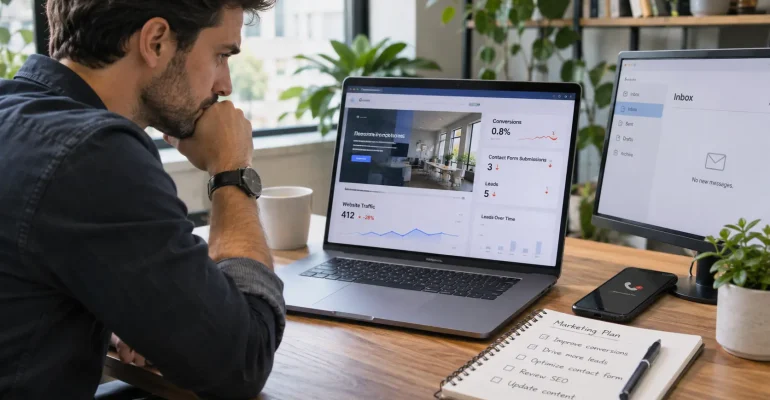
A website not generating leads can be frustrating when your analytics show steady traffic. People are finding you, viewing your pages, and then leaving without an enquiry, booking, or phone call. The instinct is often to invest in more traffic, but that can mean paying to send additional visitors through a process that already loses them.
However, foot traffic alone does not guarantee a customer conversation, and neither do website visits.
Here are 7 questions that you should ask yourself that can help you understand why your website isn’t generating leads (and how to fix it):
1. Are You Attracting Visitors Who Actually Need Your Service?
Traffic is a measure of attention, not necessarily buying intent.
A visitor searching for general advice may read an article and leave satisfied. Someone comparing local service providers has a different goal: deciding whether to contact a business.
Examine the pages receiving the most visits and the queries bringing people there. If most visitors land on educational articles but few reach service pages, your traffic may be useful for awareness without yet producing enquiries. That is not automatically a failure. Rather, it means that your measurement should reflect the purpose of each page.
2. Does Your Website Make Its Value Clear Immediately?
Imagine opening a business website and seeing “Innovative Solutions for Your Success.” It sounds positive but leaves obvious questions unanswered: What does the company do? Who is it for? What happens if you enquire?
A useful opening section tells the right visitor what service is available, who benefits, and what outcome to expect. For a Guelph business, relevant location information can also reassure visitors that the provider serves their area.
Review the first screen of your most important landing page. You can also ask someone unfamiliar with the business to explain what is being offered and which action they would take next. If they cannot answer quickly, revise the message before redesigning the entire page.
3. Is Your Website Making the Next Step Too Difficult?
A clear offer still needs a usable path to enquiry. Visitors may want to request a quote, book a consultation, or ask a question, “Why is my Website Not Generating Leads?”. If those choices are buried under menus, competing buttons, and long forms, even interested people may stop.
Give each important service page one obvious primary action. This can be achieved by using specific wording, such as “Request a website assessment” rather than an ambiguous “Submit.” Place that action where it makes sense and repeat it after substantial information when readers may be ready to act.
Forms also deserve special attention. Ask only for the information needed for people to respond appropriately. Show which fields are required, provide useful error messages, and display a clear confirmation when the form is received. Don’t forget to test the entire process on a phone, not just on a desktop preview.
To further guide you, Google Analytics documentation recommends examining website not generating leads, the stages between a page visit, a form view, a form start, and a submission. Each transition helps identify where interested visitors drop out. To build this analysis, you can see Google’s lead-form reporting guide.
Remember, better enquiries begin with a clearer path from visitor question to next action.
4. Could Speed and Mobile Usability Be Driving Visitors Away Affecting Website Not Generating Leads?
A website can look polished in a design review and still be frustrating on an everyday phone. For instance, oversized images delay loading, moving elements cause accidental taps, and forms can become difficult to use on smaller screens.
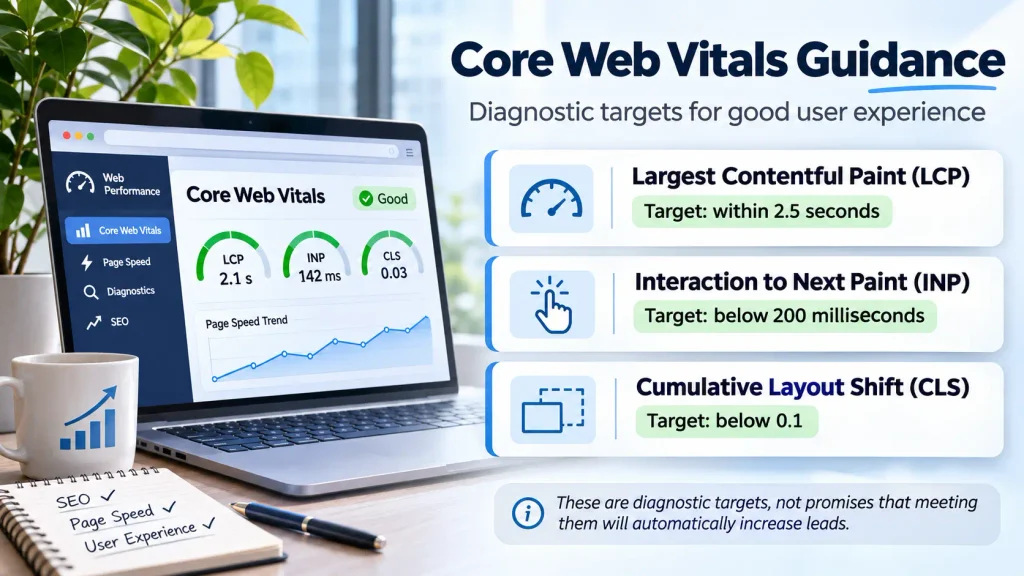
Google’s Core Web Vitals guidance recommends a Largest Contentful Paint within 2.5 seconds, Interaction to Next Paint below 200 milliseconds, and Cumulative Layout Shift below 0.1 for good user experience. These are diagnostic targets, not promises that meeting them will automatically increase leads.
Test the pages where customers actually enquire, including forms, service descriptions, and booking flows. You should also fix broken interactions and severe mobile problems before spending money on cosmetic adjustments.
After all, a page that is easy to use can remove obstacles, but it still needs a relevant offer.
5. Can Visitors Trust You Enough to Get in Touch?
Visitors often look for evidence before sharing their contact details. If a website makes broad promises without explaining the process, showing relevant work, or clarifying who provides the service, people have to fill in those gaps themselves. This can discourage your website visitors before they even consider acquiring your service.
Useful trust signals are specific: accurate business information, plainly described services, genuine testimonials used with permission, relevant credentials, transparent next steps, and examples of work you can substantiate. Avoid invented reviews, unsupported performance numbers, and oversized badges that distract from the offer.
6. Are You Measuring Actual Leads or Just Page Views?
A high traffic number can hide the central problem. If you cannot tell which pages generate enquiries, which forms fail, or whether calls become customers, you cannot confidently determine what to improve.
Start with three measures: qualified enquiries, landing-page conversion rate, and completion rate for important forms.
Consistently define a conversion rate, such as the number of submitted enquiries divided by landing-page sessions, so comparisons are meaningful.
In Google Analytics 4, meaningful actions can be recorded as key events. Make sure your chosen event fires after a successful submission, rather than simply when someone clicks the form button. You can add phone-call and booking measurement when those are important contact methods.
Indeed, traffic and enquiries should be measured separately to identify the real bottleneck of your sales funnel.
7. What Should You Fix First on Website Not Generating Leads to Turn Traffic Into Enquiries?
Begin with the pages that already attract relevant visitors. Check them in this order:
- Confirm visitor intent
- Clarify the offer
- Make the next action obvious
- Test the form
- Resolve mobile friction, and;
- Verify measurement.
This sequence helps avoid rebuilding pages before identifying the problem.
Note that not every website needs a redesign. Sometimes a better headline, a shorter form, and correct conversion tracking are the first improvements. In other cases, the page structure, mobile experience, and underlying website architecture require more substantial work.
Frequently Asked Questions (FAQs)
Aside from these 7 questions that you should ask yourself, here are other frequently asked queries that can help you build a website that converts:
Why am I getting website traffic but no enquiries?
Your visitors may have informational rather than purchasing intent, your offer may be unclear, or forms and navigation may make contacting you difficult. Review landing-page intent, mobile usability, and completed enquiry events before assuming more advertising will solve the problem.
What is a good website lead conversion rate?
There is no universal rate that suits every business. Conversion rates vary by industry, traffic source, service value, and what counts as a lead. Compare similar pages and audiences over time, and prioritize qualified enquiries rather than raw form submissions.
Can a redesign help a website in generating leads?
It can improve the experience and remove conversion obstacles, but results depend on what was wrong before the redesign. Measure existing performance first, and prioritize changes tied to actual user behavior rather than aesthetics alone.
How can I track website leads in WordPress?
Configure GA4 events for successful form submissions and other meaningful actions, such as bookings. Test events using an actual completed enquiry, and make sure each form and conversion path is measured consistently.
Turn Website Traffic Into Conversations
For businesses reviewing those broader issues, INNO Digital Solutions offers web design and development in Guelph focused on building websites around real business needs. Having more visits should not be your main objective. Instead, you should strive for a clearer, more dependable path from the right visitor to a useful conversation.
Traffic starts the opportunity. A website has to help the right person take the next step.